A Greater Way to Bank Online.
Our new digital banking experience is here! Our new online and mobile banking platform is designed to make managing your money simpler, more convenient, and more secure.
How to Enroll
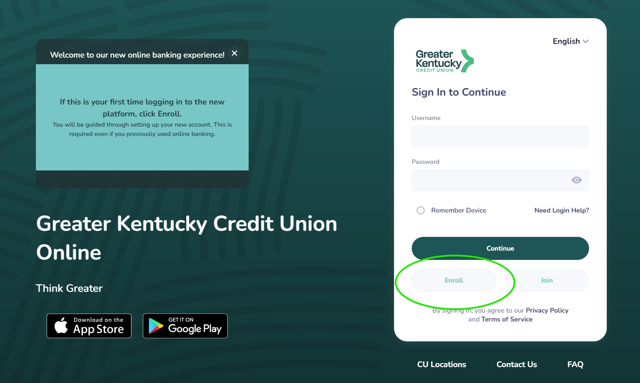
Navigate to our new sign in page. You can find it by clicking the green button on the top right of the screen.
Once you're there, click the Enroll button.
Using your phone? Delete your current GTKY app and install our new one. You can find the links below, and all the steps shown on this page will work the same.
Apple App Store: <link>
Google Play Store: <link>
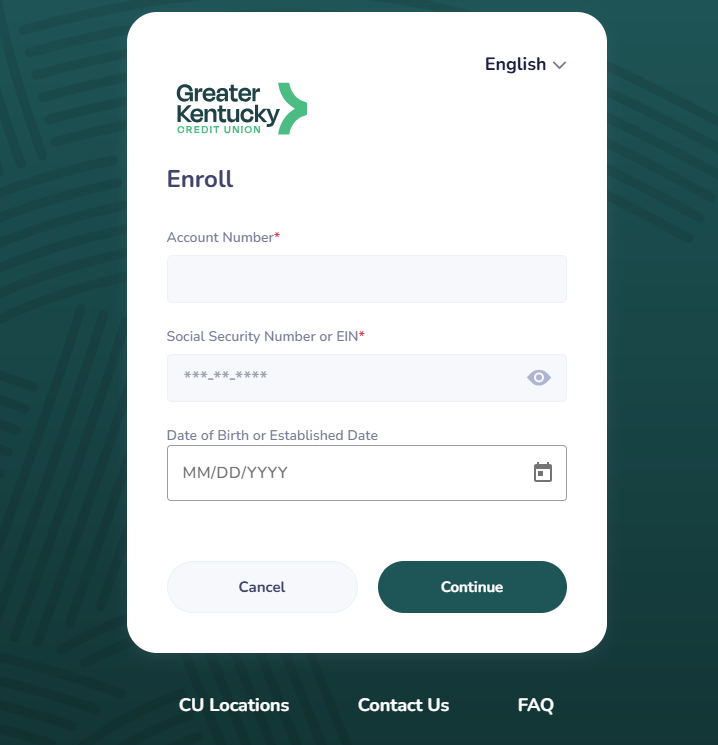
On the Enroll screen, enter the following information:
Account Number
- This is your member number. It's a number no more than 6 digits with no letters or characters. If you don't know it, let us know by calling or texting (859) 231-9300.
Social Security Number or EIN
- This is the full SSN of the primary member on the account. If you are only a joint on the account, your SSN will not work.
Date of Birth or Established Date
- This is the birth date of the primary member on the account. If you are only a joint on the account, your birth date will not work.
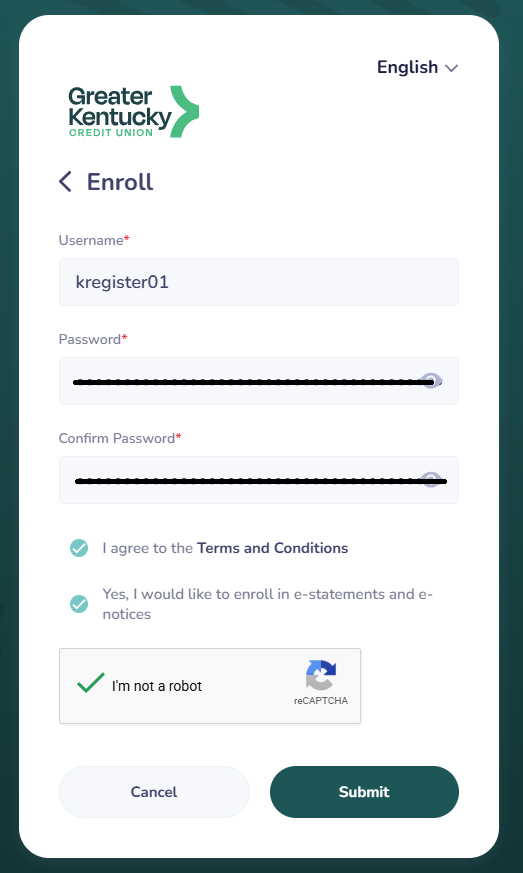
Create a username and password. The complexity requirements for each are shown below:
Username
- At least 1 letter
- At least 1 number
- No special characters
- Minimum of 6 characters total
Password
- At least 1 lowercase letter
- At least 1 uppercase letter
- At least 1 number
- At least 1 special character
- Minimum of 12 characters total
Our previous online banking allowed special characters in the username and a nine-character minimum password length. Our requirements have strengthened to increase your security.
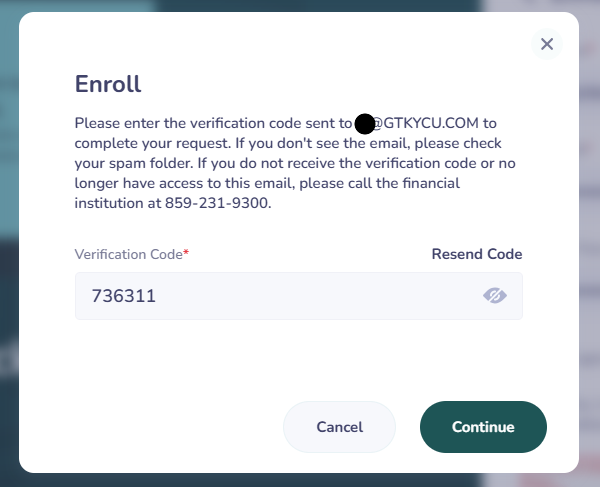
A verification code will be delivered to the contact method we have on file for you.
Not the right information? Call or text us at (859) 231-9300.

What Changed? What Stayed the Same?
Staying the Same:
- Account numbers
- Debit and credit cards
- Direct deposits
- Scheduled Bill Pay payments and saved payees
- Loan payment due dates
You'll Need to Set Up Again:
- Download the new mobile app
- Recurring and future-dated account transfers
- External account transfers
- Recurring loan payments from external accounts
- Account alerts and notifications
This is the text area for this paragraph. To change it, simply click and start typing.
Frequently Asked Questions
Why the change?
Our new platform features a much more modern-looking interface along with a host of other features that will help our members in all new ways. Look for the credit monitoring tool and Wellness+ to see what we mean! You can also conect to Plaid to see your accounts at other financial institutions right there on your home screen.
Also, our online banking experience now looks the same whether you're using the mobile app or a computer.
While we're grateful that so many members had a positive experience with our previous digital banking, we saw this as a major opportunity to Think Greater!
Will I need to download a new mobile banking app?
Yes. A new mobile banking app will be available through the Apple App Store and Google Play Store on November 10th.
Will my account numbers or debit and credit cards change?
No. Your existing account numbers and cards will remain the same. Direct deposits and loan payment due dates will also continue as usual.
Will my scheduled payments and transfers carry over?
Existing Bill Pay payees and scheduled bill payments will transfer. However, recurring account transfers, external transfers, and recurring loan payments from external accounts will need to be set up again.